The Office of the Registrar upholds the University’s mission by maintaining the integrity of academic records and providing excellent service to students, staff, faculty, and alumni.
College of Science and Health (COSH)
For the most up-to-date class schedules, please log into your MyCDU Self-Service to see real class times and rooms.
College of Nursing (CON)
Division of Student Affairs (DSA)
Credit by Examination
| SEMESTER | FIRST DAY TO REGISTER AND PAY FOR EXAM | EXAM DATES | LAST DAY TO REGISTER AND PAY FOR EXAM |
|---|---|---|---|
| SPRING 2026 | November 3, 2025 | January 6 – January 8 | January 5, 2026 |
| SUMMER 2026 | March 16, 2026 | May 12 – May 14 | May 8, 2026 |
| FALL 2026 | July 6, 2026 | August 4 – August 6 | July 31, 2026 |
| SPRING 2027 | November 2, 2026 | January 5 – January 7 | January 4, 2027 |
| SUMMER 2027 | March 15, 2027 | May 11 – May 13 | May 7, 2027 |
CREDIT BY
EXAMINATION
Spring 2026 EXAM DATES & INFO
EXAM DATES
January 6 – January 8
Students are able to take the exam between 9am – 3pm on these dates. Students will have 2-hours to complete the exam.
LAST DAY TO REGISTER FOR FALL 2025 CREDIT BY EXAMS
Students must register and pay for the exam by January 5, 2026
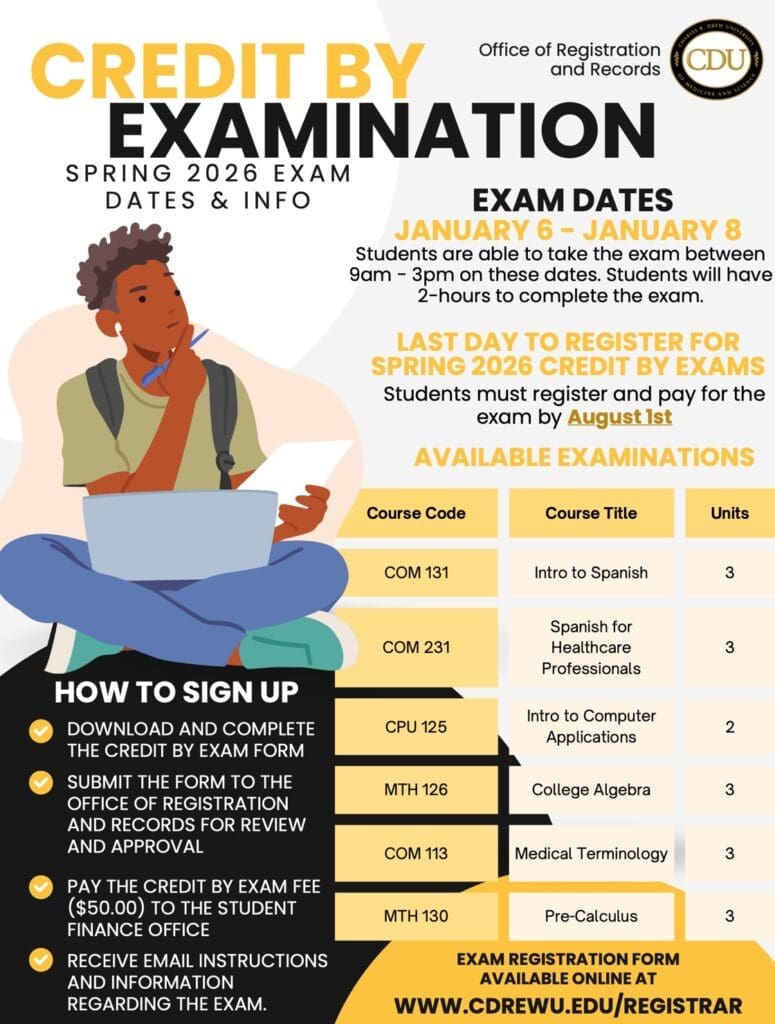
AVAILABLE EXAMINATIONS
| Course Code | Course Title | Units |
|---|---|---|
| COM 131 | Intro to Spanish | 3 |
| COM 231 | Spanish for Healthcare Professionals | 3 |
| CPU 125 | Intro to Computer Applications | 2 |
| MTH 126 | College Algebra | 3 |
| COM 113 | Medical Terminology | 3 |
| MTH 130 | Pre-Calculus | 3 |
HOW TO SIGN UP
- ✔️ Download and complete the Credit by Exam form
- ✔️ Submit the form to the Office of Registration and Records for review and approval
- ✔️ Pay the Credit by Exam fee ($50.00) to the Student Finance Office
- ✔️ Receive email instructions and information regarding the exam
Enrollment Verifications
Enrollment verifications may be requested online. Use the link below to submit your request.
Verifications will be completed within 3-5 business days of receipt of the request.
Resident Resources and Verifications
Verification of Residency may be requested in three ways:
- Via US Mail:
Charles R. Drew University of Medicine and Science
Office of Registrar & Records
1731 East 120th Street
Los Angeles, California 90059 - Via email to:
gmeoffice@cdrewu.edu - Via fax to:
(323) 563-5918
Verifications will be completed within one to two weeks of the Graduate Medical Education Office’s receipt of the request. In order to ensure a faster delivery of verification to our department, please have all verifications faxed or e-mailed directly.
All graduating students are required to submit the Degree Clearance Form to receive their official CDU diploma or certificate. Complete the form during your final semester and email it to your Program Chair to ensure timely processing and degree conferral.
| FINAL SEMESTER AT CDU | GRADES DUE FROM FACULTY | DEGREE CONFERRAL DATE (Published Retroactively) |
DEGREE CLEARANCE FORM DUE (Your diploma cannot be released without this form) |
DEGREE CONFERRAL COMPLETED BY (Up to 60 days from the end of the last semester) |
DIPLOMA ISSUED BY |
|---|---|---|---|---|---|
| FALL 2025 | December 18, 2025 | December 22, 2025 | December 21, 2025 | By February 10, 2026 | 2-4 Weeks After Degree Conferral |
| SPRING 2026 | May 14, 2026 | May 15, 2026 | May 14, 2026 | By July 7, 2026 | 2-4 Weeks After Degree Conferral |
| SUMMER 2026 | August 13, 2026 | August 21, 2026 | August 20, 2026 | By October 6, 2026 | 2-4 Weeks After Degree Conferral |
| FALL 2026 | December 17, 2026 | December 21, 2026 | December 20, 2026 | February 9, 2027 | 2-4 Weeks After Degree Conferral |
| SPRING 2027 | May 13, 2027 | May 14, 2027 | May 13, 2027 | July 6, 2027 | 2-4 Weeks After Degree Conferral |
| SUMMER 2027 | August 12, 2027 | August 20, 2027 | August 19, 2027 | October 5, 2027 | 2-4 Weeks After Degree Conferral |
Current students may print an unofficial transcript from MyCDU self-service. Alumni and former students may only order official transcripts and replacement degrees through Parchment.
Current students have access to the MyCDU self-service portal. In addition to serving as the platform by which students will register for courses every semester, MyCDU can be used to view final grades, review a current degree audit, and update personal information. Please note: alumni and former students must request an official transcript to view their academic records.
First-Time Users
If this if your first time using MyCDU, you will need to first activate your account. Head to the Password Manager webpage and click on “Onboarding.” When prompted, enter your CDU Student ID# starting with the letter “P” and followed by 9 numerals. When entering your DOB, please use the MM/DD/YYYY format (include the slashes). Follow the instructions and then write down, print, take a picture, or copy your information for your records. The username and password will be used to login to MyCDU.
Registering for Courses
- Log-in to MyCDU with your username and password
- Click on ‘Register”, then on “Cart,” and then on “Find Courses”
- Enter the course letter prefix in the “Course Code” box (i.e., “NUR” if searching for “NUR 401”)
- Click on all the boxes of the courses you want to add and then click on “Register”
- Search for rest of courses and repeat
- Confirm your courses by checking them off in your shopping cart
- Click “NEXT” to confirm
- Click “NEXT” once again to finalize and receive a notification of completion
- Done!
When to Register
Open registration dates can be found on the current Academic Calendar. During the add/drop period, you can add courses only if you meet the following conditions:
- You are an active or eligible student in an approved CDU program
- You register within your assigned registration period
- You have no registration holds placed on your student account
Dropping courses
- Log-in to MyCDU with your username and password
- Click on “Traditional Courses”
- Click on “View Schedule”
- Select the check box of the course you would like to drop
- Click “Next”
- Save and finish
- Done!
Use this webpage to learn more about the latest courses being offered, textbook information, and upcoming important dates and deadlines! Contact our office for assistance.
Please scan and submit all forms to Registrar@cdrewu.edu.
- Add/Drop
- Change of Address
- Change of Program
- Change of Program – BSN
- FERPA Release
- Leave of Absence Request Form
- LVN-BSN Change of Program
- Name Change Form
- Petition to Audit Course
- Petition for Concurrent Enrollment
- Petition To Delay Prerequisite
- Reactivation Form
- Readmission Application
- Request for Embassy Letter
- Request to Change Catalog Year
- University Withdrawal
College of Science and Health (COSH)
College of Nursing (CON)
- If you have forgotten your username, contact the helpdesk at (323) 563-4900 or email at helpdesk@cdrewu.edu.
- If you have forgotten your password, you can reset your password at https://psswrd.cdrewu.edu.
- If you have successfully logged into MyCDU but are unable to add your course(s), please contact the Office of Records & Registration at (323) 563-4856 or send an email to registrar@cdrewu.edu.
- For Blackboard support, contact Linda Towles at lindatowles@cdrewu.edu.
Allowing Veterans to Attend or Participate in Courses Pending VA Payment
In compliance with 38 USC 3679(e), Charles R. Drew University of Medicine and Science ensures that eligible veterans and service members using Post-9/11 G.I. Bill® (Ch. 33) or Vocational Rehabilitation & Employment (Ch. 31) benefits can attend and participate in courses while VA payments are pending.
The University will not:
-
Prevent enrollment
-
Charge late fees
-
Require alternative funding
-
Deny access to classes, libraries, or other facilities
To qualify, students must:
-
Submit a Certificate of Eligibility by the first day of class
-
Provide a written request for certification
-
Submit any additional required documentation
For more details and support, visit our Veterans Resources page.
Our Team
Raquel Munoz, Registrar
Anjaila Van Ostrand, Associate Registrar
Akilah Wilson, Assistant Registrar
Caitlyn Cannon, Transfer Credit Articulation Officer
Contact Us
Write to us with all questions regarding your academic records and/or our general services at registrar@cdrewu.edu. For support regarding transfer work and credit, write to us at transfercredit@cdrewu.edu.
For support regarding VA benefits, write to us at va.certify@cdrewu.edu.
Call: (323) 563-4856
Location: The Student Center